PPWR labelling: what must stay on the pack, and what can move to the QR
The most expensive mistake in packaging compliance is treating the label as the place where every requirement has to fit. Under the EU Packaging and Packaging Waste Regulation (PPWR), it isn't. A growing share of the mandated information can — and in practice should — live behind a digital data carrier, not crammed onto the artwork. Here's how to draw that line.
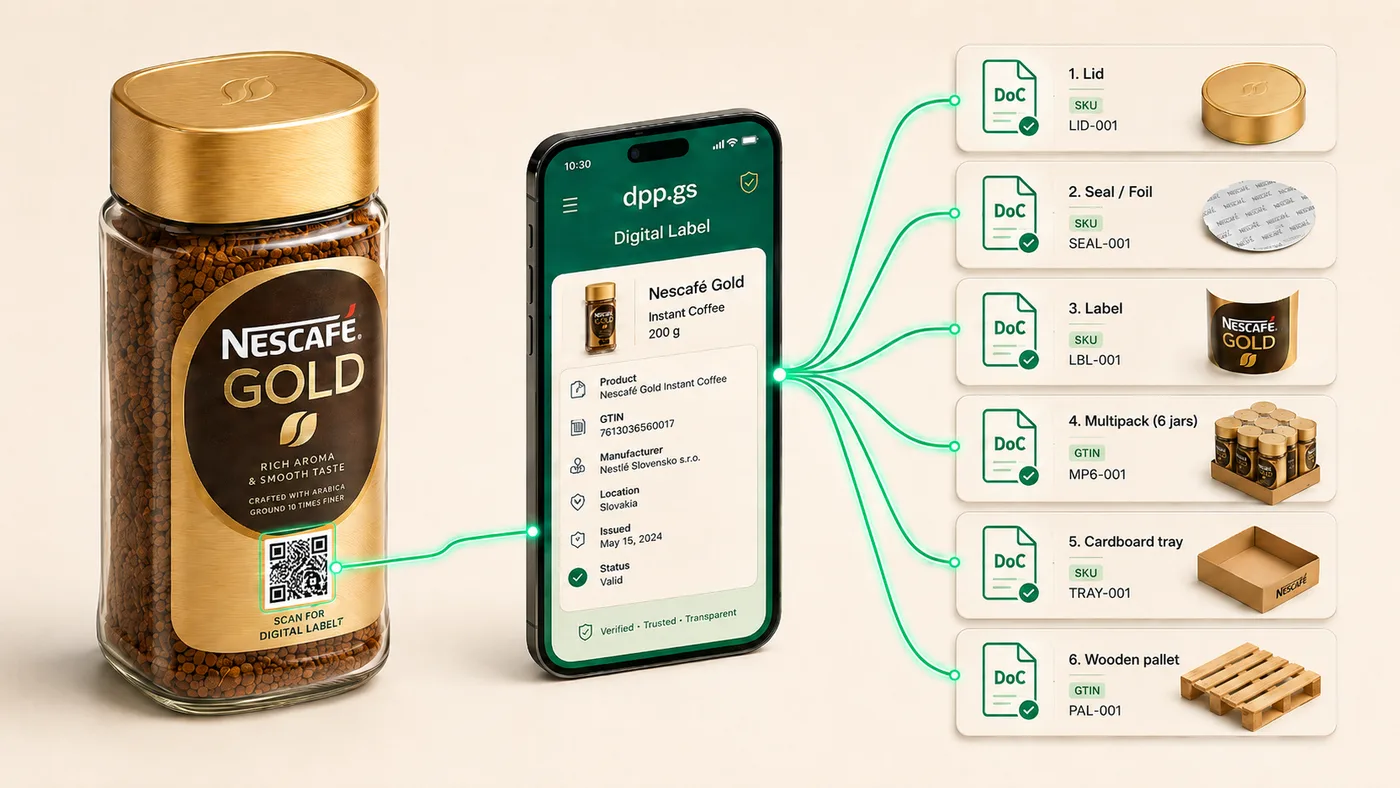
One label QR, every packaging layer
Take a jar of instant coffee. It isn't one wrapper — it's a stack of packaging: the lid, the seal / foil, the label, the multipack that groups six jars, the cardboard tray, and the wooden pallet they ship on. PPWR touches all of them — but you don't put a QR on each one.
In dpp.gs, every packaging layer is its own record, keyed by its SKU or GTIN, with its own Declaration of Conformity and data. The consumer product carries just one QR — on the label. Scanning it opens the passport, and from there whoever needs it — a retailer, a recycler, a market-surveillance authority — reaches the exact layer they care about and its DoC. One code on the shelf, the full packaging hierarchy behind it (as shown above).
PPWR introduces harmonised labelling so consumers sort correctly, so reusable and deposit packaging is recognisable, and so substances of concern are traceable. Crucially, the regulation treats a digital data carrier — a QR or similar code that resolves to structured product data — as a legitimate way to convey much of that information, rather than printing all of it on a finite surface.
That single design choice has real consequences: smaller mandatory print area, fewer market-specific label variants, and the ability to correct or extend information after a run is printed. The QR doesn't change; the data behind it does.
The practical split
Final harmonised symbols and the exact printed minimum are fixed by the Commission's implementing acts, and you should always confirm against the latest text for your packaging category. But the working division most producers can plan around looks like this:
Physical, harmonised marks
- Material / sorting pictogram
- Separate-collection symbol
- Deposit-return (DRS) mark, where a scheme applies
- The data carrier (QR) itself
Structured, updatable data
- Full material composition (% by weight, layers)
- Recyclability class and recycled content
- Substances of concern above threshold
- Reuse and return-point instructions
- EPR registrations and producer identification
- Declaration of conformity and supporting documents
Why this matters commercially
Three benefits compound once the information moves off the artwork:
- Less reprinting. When recyclability data, an EPR registration number, or a return-point address changes, you update the passport — not the print plates.
- One code, every market. A single GS1 Digital Link QR resolves to the same passport in 28 languages. No per-country label variant, no translation reprints.
- One code, every audience. The same QR serves the consumer (sorting, deposit), retail (product data) and a market-surveillance authority (compliance documents) — each sees the view they need.
What the QR actually points to
Under GS1 Digital Link, the QR encodes a normal web URL built around the product's GTIN — for example https://dpp.gs/01/{GTIN}. Scanned by a phone it opens the passport; requested by a system it can return structured data. One identifier, both worlds. (We unpack this in GS1 Digital Link, explained.)
Here's a worked example: a 500 ml PET beverage bottle with one on-pack QR resolving to its full packaging passport — material composition, recyclability, deposit and producer information, in any EU language.
→ Open the live example passport
A checklist to take to your design studio
Your design team owns the artwork down to the millimetre — that's not our job, and it shouldn't be a tool's job either. What helps is arriving with a clear list of what has to be printed and what you're moving behind the QR, so the layout is right the first time.
Free: the PPWR on-pack vs QR checklist
A one-page split of printed marks vs passport data — print it and hand it to your studio.
Open the checklist →And when you're ready to mint the QR: set up the packaging passport once, generate the GS1 Digital Link QR (and a GS1 DataMatrix), and hand the finished artwork to your printer. See the full approach on the packaging labelling page.
Put PPWR labelling on a QR
GS1 Digital Link QR, 28-language passport, packaging fields built in.
Get startedThis article is general information, not legal advice. PPWR labelling requirements and timelines are defined by Regulation (EU) 2025/40 and its implementing acts; confirm the printed minimum for your packaging category against the current text.