EN
Login Sign Up

The EU DPP Registry, explained

The European Commission opened the Digital Product Passport Registry on 20 July 2026, and the rules governing it — Implementing Regulation (EU) 2026/1778 — took effect on 6 August 2026. It is the central point through which every digital product passport required by the ESPR and the Battery Regulation is registered.

Everything on this page is taken from the Commission's own manual for economic operators, version 1.03, published 16 September 2026 — including the screenshots. We have added the parts that trip people up.

Start here: it is a phone book, not a filing cabinet

The single most common misunderstanding. The Registry does not hold your product data — it holds a pointer to it. Your passport lives with you, or with a provider you choose, and it has to answer every time someone scans the code.

Kept by the Commission

The DPP Registration Record

An EU-level index entry. Its job is compliance checks, authority search and cross-border enforcement — not showing anything to a consumer.

What's in it
Registration metadata, identifiers, interoperability metadata and access rules. Not the technical dataset.
Who controls it
The Commission. No subscription fee expected. Only verified economic operators may write to it.
Kept by you

The DPP Data

The passport itself — everything a consumer, a recycler or an inspector actually reads after scanning the QR code.

What's in it
At minimum every required attribute of the schema for your product group; at most the required and optional ones.
Who controls it
In the guide's words: “the economic operator's or a service provider's database”, and “the economic operator has full control and responsibility”. It must be resolvable at all times.

What actually happens, end to end

Three stages. The first takes minutes, the second is the one that fails, the third is currently a waiting room.

1 · Get inMinutes, if you already have an EU Login
1.i Go to the Registry

registry.product-passport.ec.europa.eu — you are redirected straight to EU Login.

1.ii Sign in with EU Login

The Commission's single sign-on, with multi-factor authentication. No EU Login yet? Creating one is free and takes a few minutes.

1.iii Land on the Welcome page

From here you start enrolment. Nothing about your products yet — first the Commission has to know who you are.

The account is personal. The organisation comes next.
2 · Prove who you areThe part that gets rejected
2.i Describe the organisation

Legal name, registered address, country, one identifier (NTR preferred, or LEI, VAT, eID) and a compliance contact. A sole trader enrols as a natural person instead.

2.ii Request the sealed PDF declaration

The Commission locks your data into a PDF and seals it. Change anything afterwards and verification restarts.

2.iii Seal it — offline, outside the Registry

Your legal representative counter-seals that exact file with the company's QSeal (or QES, for a sole trader).

This is where it goes wrong — see below
2.iv Upload and submit

Back in the Registry. PDF only, up to 1 GB, filename under 100 characters.

2.v Verified — you are the administrator

The Activity Dashboard reports PROCESSING, then SUCCESS or FAILURE. A success report tells you the day your seal expires.

Verified status lasts as long as your certificate, and never more than three years.
3 · Register passportsOpen, but not yet finishable
3.i Pick the product group

Batteries — industrial, EV and LMT — is the first and, today, the only one. Others follow their ESPR delegated acts.

3.ii Choose how to submit

One passport through a web form, or a JSON/XML file with up to 100 at a time. Templates are provided.

3.iii Give the UPI

A URL that resolves to your passport. Model and batch identifiers are optional; today only item-level registration is offered.

3.iv Get a URI back

The Registry's own identifier for the record, which you store alongside the passport.

Not possible yet — see “Where it stands today”
In a batch of 100, one bad row rejects all 100.

Where applications actually fail: the seal

Verification is automated and unforgiving, and nearly every rejection comes from the same handful of causes. None of them are about your products. Worth reading before your legal representative sets aside an afternoon for this.

A qualified certificate is not a qualified seal

A certificate delivered as a software file (.p12, .pfx) produces only an advanced signature — AdES/QC — which is rejected. You need the key on a smart card or USB token, or a qualified remote signing service run by your QTSP.

Adobe Acrobat's default format is wrong

Out of the box Acrobat embeds signatures in a format that is not PAdES-compliant, and the declaration is rejected even though the certificate is perfectly valid. Set the “Default Signing Format” option to CAdES-Equivalent before signing.

Only four signature profiles are accepted

PAdES Baseline B, T, LT or LTA. Anything else — other containers, other formats — is refused outright.

Your form must match your certificate exactly

Not approximately. Since v1.03 the rejection report names each mismatching field and prints both values side by side, so at least you can see what to fix.

What you typeCertificate attributeOID
Legal nameorganizationName2.5.4.10
Country of registrationcountryName2.5.4.6
IdentifierorganizationIdentifier2.5.4.97
Touch nothing else in the file

After you download the sealed declaration the only permitted change is adding your own seal. Any other edit breaks the Commission's seal and the submission fails.
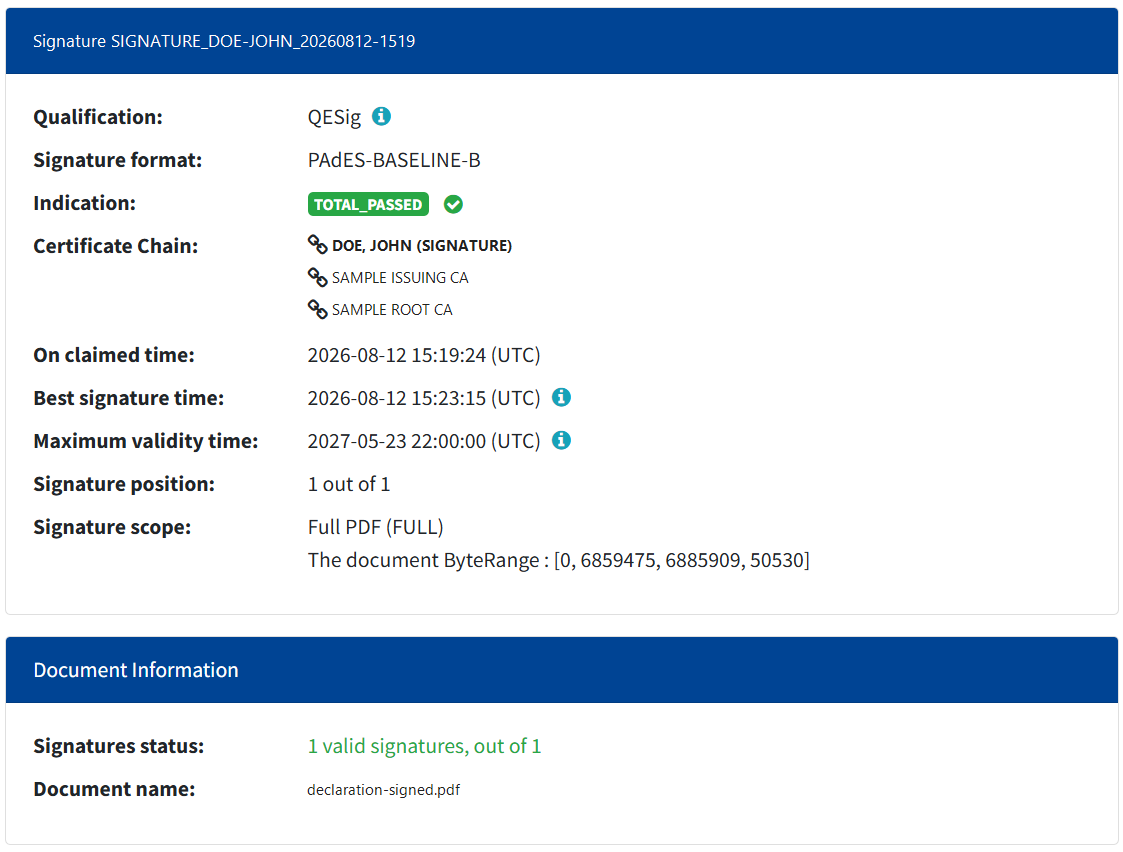
Validation result showing Qualification QESig, signature format PAdES-BASELINE-B and indication TOTAL_PASSED
Check it before you submit. The Commission's free DSS validation tool tells you in advance whether your seal will pass. The line that matters is Qualification: it must read QESeal for a company or QESig for a sole trader. If it says AdESeal-QC or AdESig-QC, the Registry will reject you — almost always because a software certificate was used. Screenshot: DPP Registry User Guide for Economic Operators v1.03 · © European Union, 2026
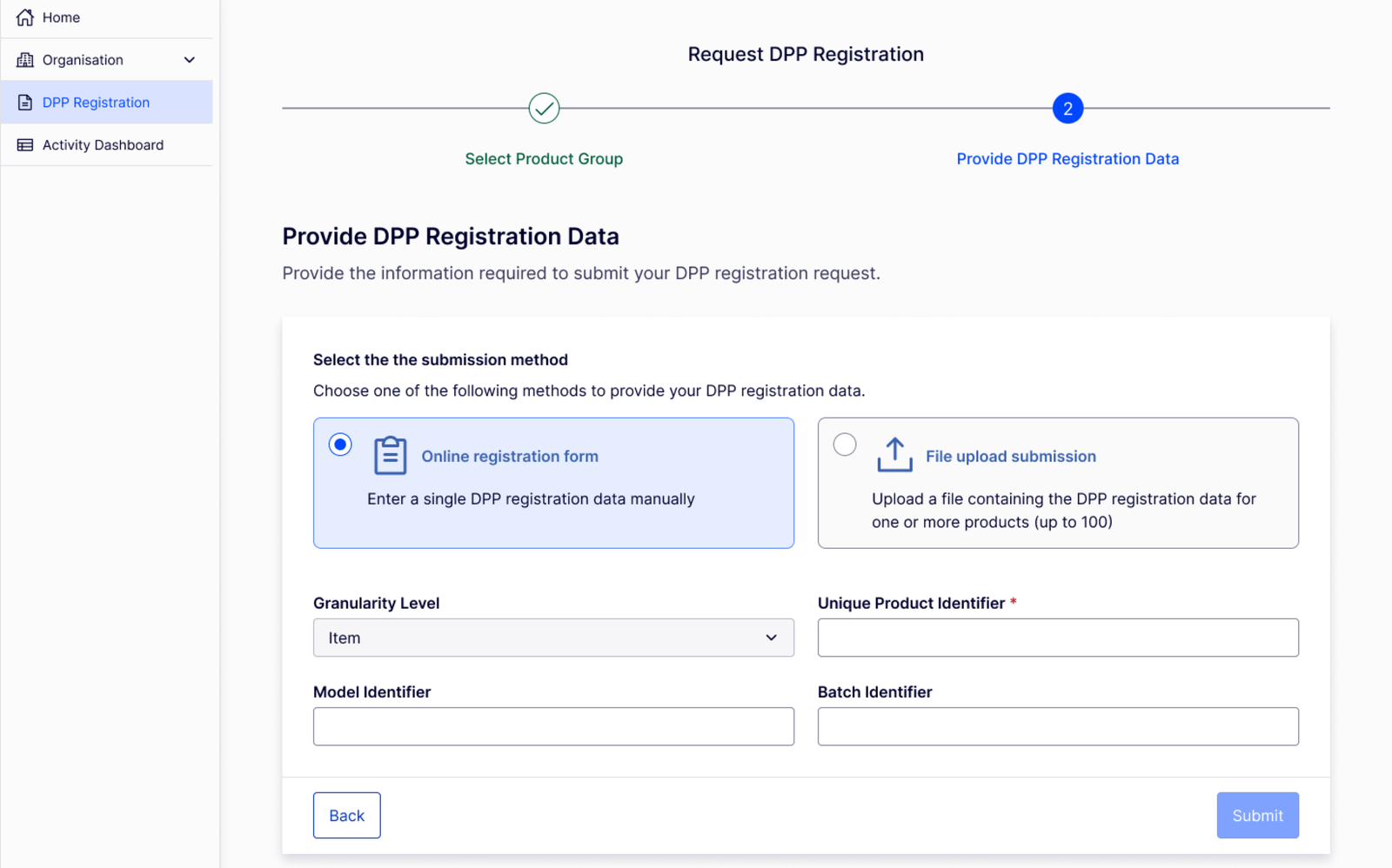
What the Registry asks of your passport link

One field carries the whole thing: the Unique Product Identifier. It is a URL, and the Registry fetches it to check that it genuinely resolves. This is the part a passport platform exists to get right.

The Registry's DPP registration screen: choose an online form or a file upload of up to 100 products, then provide granularity, unique product identifier, model and batch identifiers
Registering a passport. Two routes — one at a time through the form, or up to 100 in a JSON or XML file. The Unique Product Identifier is the only mandatory field on the screen. Screenshot: DPP Registry User Guide for Economic Operators v1.03 · © European Union, 2026
It must be a real, working URL

HTTPS only, a URL format compliant with JTC 24, up to 2000 characters. Plain http:// is refused at the form.

It must still resolve when they check it

The Registry follows the link. Too many redirects, a redirect that drops to a less secure protocol, a disallowed domain or port, or an oversized response, and you get NOT_RESOLVABLE_UPI. A passport URL is infrastructure, not a marketing link.

Every identifier must be unique within the submission

Two passports sharing a UPI in one file fails the file. And a single bad row rejects the whole batch of 100 — so validate before you upload, not after.

Filenames are fussy

Letters, digits, dot, underscore and hyphen only. No spaces, no slashes. Under 100 characters, under 1 GB.

Where it stands today — honestly

The Registry is live, and that is genuine. But live does not yet mean finished, and you should plan around what it can actually do this week.

Enrolment and verification: working

You can enrol your organisation and be verified today. This is the long pole — the seal, the legal representative, the QTSP — so there is real value in starting now.

Passport registration: not finishable yet

The guide states it plainly: registration of battery passports “is not currently available, as the semantic catalogue for this product group has not yet been defined”. The screens are there; the submissions cannot yet succeed.

One product group, one granularity

Batteries only, item level only. Model and batch levels are defined but not offered. Other sectors arrive with their ESPR delegated acts.

English only, for now

The Registry interface and the PDF declaration are available in English only — worth knowing before you route it to a legal department that works in another language.

There is a sandbox

A test environment mirrors the real verification process, so you can rehearse the seal without risk. It needs a separate EU Login, and anything you create there may be wiped.

Verification expires

Verified status lasts as long as your electronic identification means, and never more than three years. After that you repeat the process, or you can no longer register or modify passports.

Where dpp.gs fits

The Registry stores a link. We are what the link points to.

We host the passport

We hold the DPP data, serve it to whoever scans the code — consumer, recycler, market authority — and keep it resolvable for the product's whole life. That is the obligation the Registry checks.

We hold the backup link

The decentralised model expects a second route to your passport, held by a DPP service provider, so the data survives even if you stop operating. That is part of what you are buying.

We keep your UPIs registrable

Stable HTTPS URLs, no redirect chains, no downgrades — built so the Registry’s resolvability check passes the first time. GS1 Digital Link is our default shape, but the EU does not mandate it: EN 18219 recognises five identifier schemes, and a passport of ours can be identified by EPC, UUID, DID or MA-DPP just as well.

Your identity stays yours

Enrolment and the QSeal are tied to your company and your legal representative, and the Registry gives no one a way to do that part for you. We prepare you for it; we cannot stand in for you.

Not sure which route is yours?

The steps differ depending on whether you are established in the EU, exporting into it, or acting for someone who is.

See the process for my role